
Pictory Free Trial: I Tested It to Its Limits - Here They Are
A capable 14-day trial with watermarked exports, file-upload friction and a resolution mismatch in our test.
Watch the actual test
Our own files and images, built-in demo routes, download checks and the pricing discrepancy.
What $0 gets you
Every number below is from the vendor's own pricing page, https://pictory.ai/pricing/ and https://app.pictory.ai/planslistembed, checked September 30, 2026. The published 720p maximum conflicts with some downloaded results in our test.. Not marketing copy - the actual limits.
The review
Pictory's free offer is a 14-day trial, not a free tier you can keep using. Its pricing page says the trial includes three video projects. The detailed public comparison lists 15 video minutes, 50 generative AI credits, 500 MB storage and 720p maximum export resolution. We checked those public pages on September 30, 2026. Trial exports in our test carried a Pictory watermark.
We tested our own three-image project, our own PDF and PowerPoint, and several built-in demo routes. The three-image project downloaded as a watermarked video. The editor estimated 15 seconds, while the downloaded file ran 21 seconds including Pictory's end card. Our PDF and PowerPoint returned to an empty upload dialog. Built-in sample projects opened, but those samples do not establish that our files convert successfully.
The export result needs care. A demo summary offered 1080p in the interface but its downloaded file decoded at 720p. Other trial exports we checked decoded at 1080p. Pictory's public comparison still says 720p is the trial maximum. That is a discrepancy in this test, not a promise that the trial will export your project at 1080p. Check the downloaded file, not only the selector.
Pictory's public pricing page on September 30 showed Starter at $25, Professional at $35 and Team at $119 per month when billed annually. Those are annual-billing monthly equivalents, not month-to-month prices. Prices and offers may change; check Pictory before paying.
Our take: test the workflow you need using one small file and a short export. If the result is usable, you can weigh the paid plan against your volume and editing needs. If you need a permanent free video editor, a 14-day trial is not one.
Follow-up test ·
Pictory 3 retest: 1 prompt, 5 scenes, 8.4 credits
New video-agent test on a 14-day trial. The September test and embedded video above describe the earlier version. The score is now 3.2/5, up from 2.9.
Pictory 3 adds a video agent that plans scenes from your brief or source file. You can review the script, ask for changes by chat, then generate the download. We tested a new free trial with a fictional library guide.
What worked
A 60-second text brief became a five-scene stock video. The script kept our four source facts: 10:00-18:00 opening hours, up to 3 books, a 14-day loan, and one renewal only if nobody else was waiting. The final download used 1920×1080 H.264 video at 30 fps. It ran 66 seconds, including a roughly 6-second Pictory-branded outro. Pictory branding remained on the video.
We also uploaded a new, original one-page PDF. Pictory accepted it and extracted its four facts. That is a better ingestion result than our earlier test, where our PDF and PowerPoint uploads failed. This was a different file, and we did not retest PowerPoint or original-video upload.
What still needed work
Our focused chat edit did not produce a clean final caption. The first request changed narration rather than visible text. A more explicit request changed the caption but removed spaces. A third request did not restore them, and the joined words remained in the downloaded file.
The PDF's 30-second preview also needed repair. One scene showed part of our production instructions as its caption. The opening hours were absent, although the borrowing and renewal details remained. The reader had extracted the facts, but the final presentation did not preserve the brief well enough to publish. We did not export or keep retrying that preview.
What the trial gives you
Pictory's public trial table checked October 22 lists 14 days, 300 AI credits, 3 videos, Pictory branding, 500 MB, and a 720p export limit. Script/URL videos have a 5-minute maximum; the imported-video editor has a separate 15-minute maximum.
Our single downloaded test file measured 1080p despite that 720p table. Treat this as an observed result, not a guaranteed trial benefit. Our account's trial screen showed an end date of November 5, 2026.
The first stock preview cost 7.30 credits. Three chat changes added 1.10, for 8.40 credits on that project. The PDF preview used 7.10. Total usage was 15.50 of 300 credits, leaving 284.50. We used stock footage with no voiceover or generative clips, so these numbers are not a benchmark for every workflow.
Our take
Pictory 3 is a useful place to start a stock-video draft. Its planned scenes are easy to review, and PDF ingestion worked on our new source. But the two tests still needed careful caption checks. Budget time to inspect and repair the output rather than assuming the agent's last answer is a finished video.
The earlier review remains the record of our previous test. Its older 50-credit allowance must not be read as today's trial offer.
Why the score moved from 2.9 to 3.2
Pictory 3 has a chat agent that plans and edits scenes, and PDF upload worked in our retest, so it is somewhat better than the earlier version for this workflow. The caveats stay: a caption-spacing bug in the preview, a 720p public limit versus the 1080p we exported on the trial, and Pictory branding on the export.
The catch
This is a 14-day trial, not a permanent free editor. Our own PDF and PowerPoint uploads returned to an empty dialog; some trial exports decoded at 1080p while Pictory's public trial table says 720p maximum. Test your exact route before paying.
From the actual trial
Test output and controls, plus the vendor pricing page. Captured September 2026.
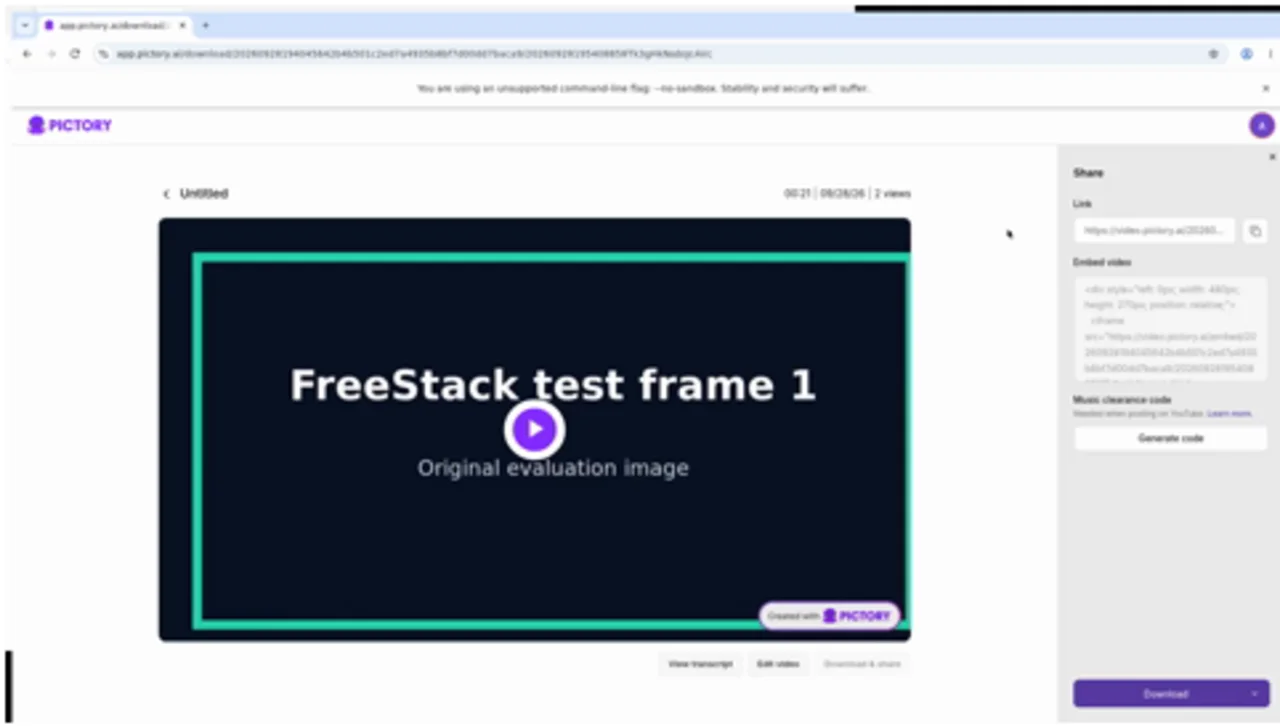
Our three-image test reached a downloadable, watermarked result. The player showed FreeStack test frame 1; the downloaded file ran 21 seconds including Pictory end card.
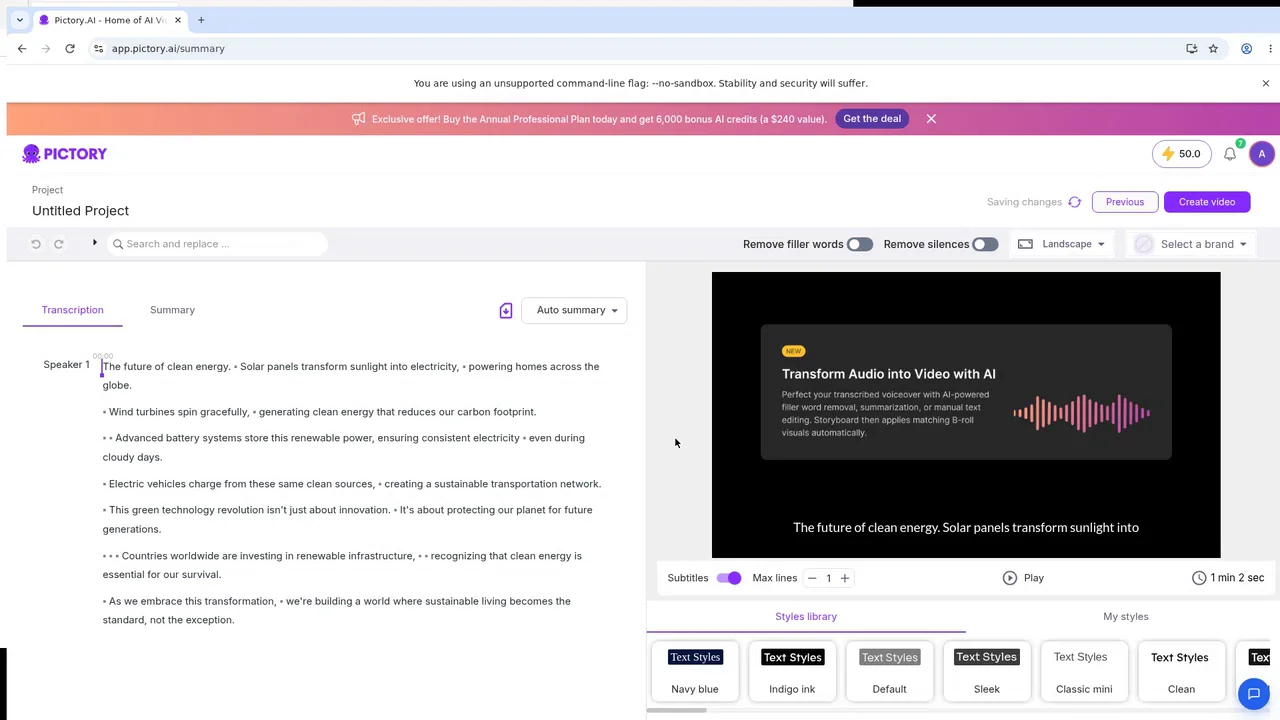
The demo audio route offered editable transcript and visual style controls. This is built-in demo content, not our own uploaded audio.
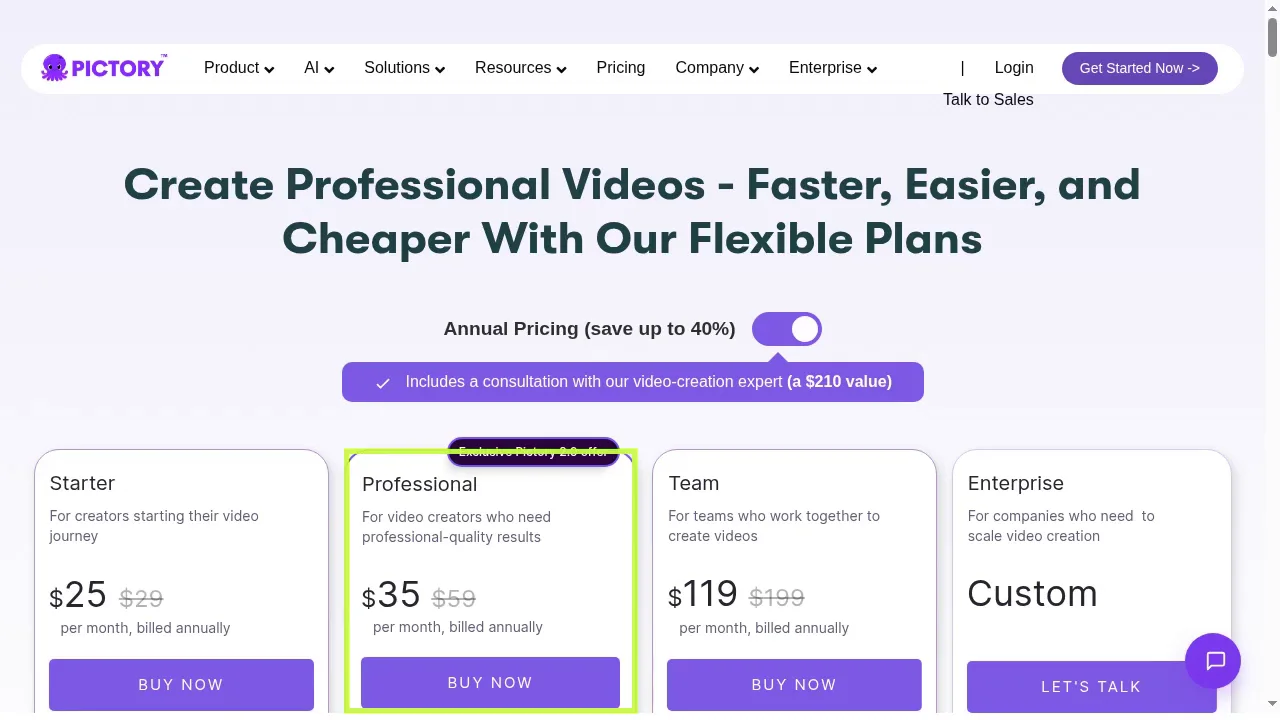
Pictory public pricing on September 29: $25 Starter, $35 Professional and $119 Team per month, billed annually. Verify current prices before paying.
Pictory free plan: questions people ask
Is Pictory really free?
It offers a limited free trial, not a permanent free plan. The free plan: 14-day trial only, no permanent free plan. Credit card: No card was requested in our trial test. What $0 gets you: Trial length: 14 days; Video projects: 3; Video minutes: 15; Generative AI credits: 50; Storage: 500 MB; Published trial maximum resolution: 720p; Watermark: On trial downloads.
What's the catch with Pictory's free plan?
This is a 14-day trial, not a permanent free editor. Our own PDF and PowerPoint uploads returned to an empty dialog; some trial exports decoded at 1080p while Pictory's public trial table says 720p maximum. Test your exact route before paying.
Who is Pictory's free plan best for?
Creators who can run a real small-file test during a 14-day trial before committing to a paid plan.
Is Pictory worth it on the free plan?
The trial is useful for testing a specific video workflow, but do not assume the export selector or a built-in demo proves your own file will work. Download a short project and check the resulting file before buying. Our score: 3.2/5, tested September 2026.
The trial is useful for testing a specific video workflow, but do not assume the export selector or a built-in demo proves your own file will work. Download a short project and check the resulting file before buying.
I earn a commission if you sign up through my links (at no extra cost to you).
The “Try Pictory free” button is an affiliate link - if you sign up through it, we may earn a commission at no extra cost to you. How we disclose.
Get the next $0 tool test
One email when a new review drops. No newsletter fluff, no selling your address.